
How to Review QC Photos Step by Step (2026 Guide)
By Chen Hong Jie · Updated · 5 min · Español · Français · Italiano · Français (CA)
Quick answer
Review QC photos in this order: 1) right item, colour and size; 2) serious defects such as stains, tears or broken zippers; 3) measurements against the seller’s chart; 4) finishing details like stitching, prints and glue. If anything in the first two steps fails, ask for an exchange (RL). If you can’t see something, ask for extra photos before you decide.
To review QC photos properly, go through them in a fixed order: first confirm it’s the right item, colour and size; then hunt for serious defects; then compare the measurements with the seller’s chart; and only then look at finishing details. That order keeps you from obsessing over a loose thread while missing the fact that you got a size M instead of an L. This guide walks you through each step, shows you what counts as a deal-breaker, and tells you exactly what to do when a photo doesn’t show enough.
What QC photos are and why they matter
QC photos (quality check) are the pictures your shopping agent takes when your order arrives at its warehouse in China. For buyers in Canada, they’re the only moment when you can see the real item and still exchange or return it cheaply. Once your parcel leaves China, sending something back means paying international shipping again and waiting weeks, which usually isn’t worth it.
That’s why it pays to spend five focused minutes on every item instead of clicking “approve” on autopilot. Most problems people complain about after receiving a haul — wrong size, a stain on a white hoodie, mismatched sneakers — were visible in the QC photos all along.
The 4-step method
Step 1: Is it what you ordered?
- Model and variant match the listing (cut, details, logo placement).
- Colour is right, allowing for warehouse lighting (more on that in our guide to QC photo colour differences).
- Size: find the size label. If it isn’t in any photo, ask for one — it’s the single most useful extra photo you can request.
Step 2: Serious defects
Open every photo at full size and look for:
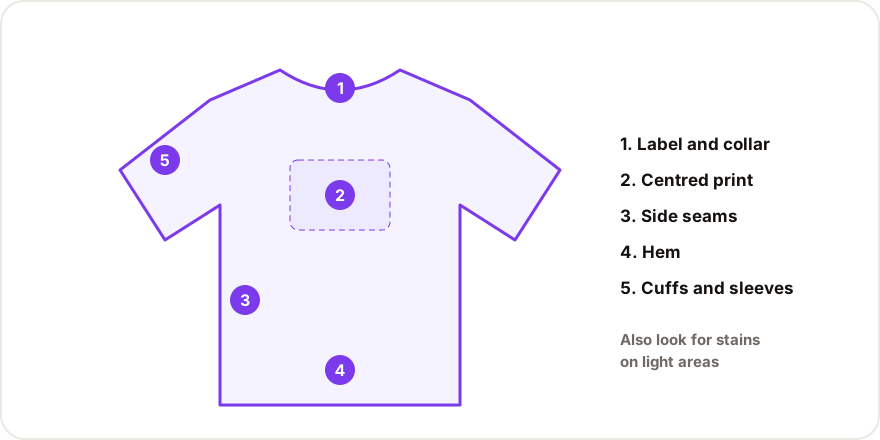
- Stains, especially on light-coloured areas.
- Holes, tears or seams that have come open.
- Bent or broken zippers.
- Missing parts or accessories (laces, straps, cables).
Step 3: Measurements
If the agent photographs the item with a tape measure, compare it with the seller’s size chart. For clothing, ±2 cm is normal. Many Chinese charts list the full chest or waist (胸围, 腰围); divide that by two to compare it with a flat measurement taken across the garment.
Step 4: Finishing
- Straight, even stitching.
- Prints and embroidery centred and sharp.
- Visible glue on sneakers, mainly where the sole meets the upper.
How to actually look at the photos
| Tip | Why it helps |
|---|---|
| Open each photo at full size | Thumbnails hide small stains and loose threads |
| Compare with the store photos side by side | You’ll catch changes in model, colour or logo position |
| Check one area at a time (collar, cuffs, hem…) | You won’t skip details when you’re scanning quickly |
| Use a computer or tablet if you can | More pixels, more detail |
| Look at both shoes of a pair together | Asymmetry is easier to spot side by side |
Serious or minor? A quick reference
| Severity | Examples | What to do |
|---|---|---|
| Critical | Wrong size or colour, visible stain, tear, broken zipper | Exchange or return (RL) |
| Important | Measurements off the chart, crooked seams, off-centre print | Your call: accept or exchange |
| Minor | Loose threads, a little glue, creases from packing | Usually GL; you can fix it at home |
If you’re not sure where a defect falls, our guide on what GL and RL mean gives you clear rules, and the list of minor defects you can fix at home shows what isn’t worth a return.
To make sure you don’t forget anything, open the QC checklist for your product type — for example the sneaker checklist or the T-shirt and hoodie checklist. You mark each point as good, bad or can’t tell, and it gives you a suggested verdict.
When you can’t see something
QC photos are often taken quickly, under the same lights, from the same angles. It’s completely normal for one important detail to be missing. Don’t guess — ask. The request is short:
- Say exactly which part you want to see (size label, sole, inside, zipper closed).
- Write it in plain English and add the Chinese version so the warehouse can act on it right away.
- Send it through the agent’s chat, ticket system or photo service.
The agent message generator builds that text for you in English and Chinese. For more detail on what to ask for each product, read how to ask your agent for extra photos and measurements.
A worked example
Say you ordered a grey hoodie in size L. The agent sends four photos: front, back, a close-up of the print and the label.
- Right item? The cut and print match the listing. The label says L. ✓
- Defects? At full size, there’s a small dark spot near the left cuff. ✕ That’s a stain on a light colour — critical.
- Measurements? No tape in the photos, so you can’t tell. You’d normally ask, but the stain already decides it.
- Verdict: RL. Ask for an exchange with the seller, and request a measurement photo for the replacement.
Without the zoom, that spot would have been invisible on a phone thumbnail — and you’d have found it at home, with no cheap way to send it back.
Before you approve everything
When all your items have been reviewed, do one last pass before you create your parcel:
- Every item has either a GL or a pending exchange.
- You’ve asked to remove bulky boxes you don’t need (it can reduce your parcel size).
- Any battery-powered items are flagged, since some shipping lines don’t accept them.
Five careful minutes per item now saves you weeks of frustration later.
Frequently asked questions
+What are QC photos?
They’re real photos your agent takes of your item when it reaches their warehouse in China. They let you check the item before you pay for international shipping to Canada.
+How long do I have to review my QC photos?
It depends on the agent and on the seller’s return window, which on Chinese platforms is often around seven days after delivery to the warehouse. Review your photos as soon as they show up.
+Are QC photos free?
Most agents include a few photos per item at no charge. Extra photos, videos or detailed measurements may cost a small fee, depending on the agent.
+Should I review QC photos on my phone or my computer?
A computer or tablet is better. A bigger screen makes small stains, uneven stitching and glue marks much easier to spot.